
Match Criteria Used to Generate Hit Results
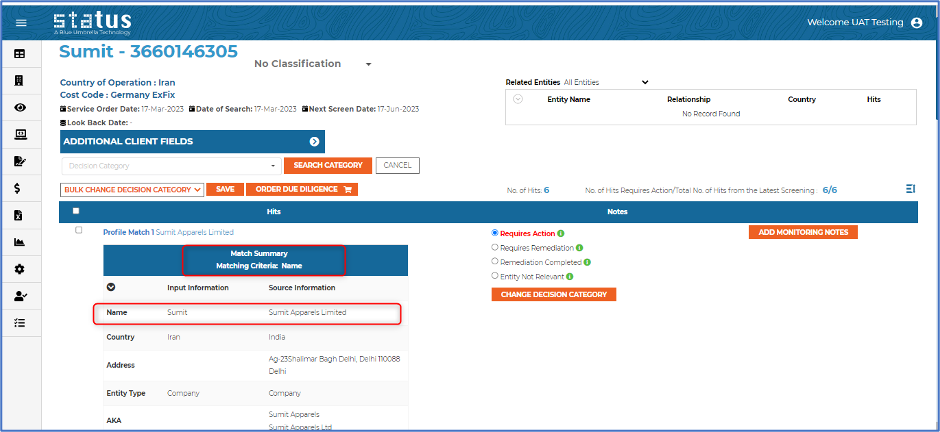
Users can now see the criteria used to match and generate the hit results when Match Summary result is displayed on hit pages, BI Quick Check read more pop-up, Quick Check reports, and Monitoring reports. Criteria can be any valid field for an individual or company, which triggers results from data source, for example, name and address.
Address Matching on Instant Check
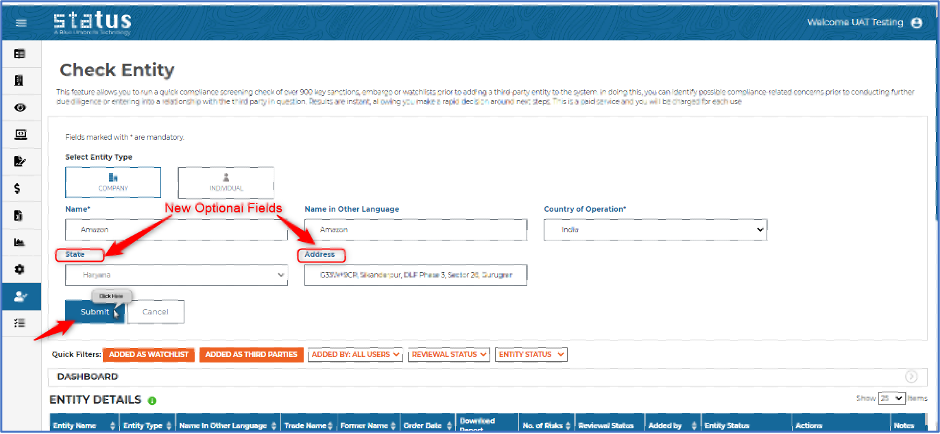
We have enhanced our Instant Check page and added an address field to improve matching and consistency in our results. Users can now enter an optional address and state name to match the third-party. Whenever a user adds the entity as a new third-party from Instant Check, all the details will be pre-populated.
Brand Refresh to Our Reports, BI Graphs, and Email Communications
We have a new look and feel for our Blue Umbrella brand and have refreshed our Blue Umbrella logo. Lookout for our new logo on all our Status reports, BI graphs, and email communications.

We always welcome your feedback and suggestions on how to make Status more impactful to your compliance workflow.
For more information on the production updates, please reach out to your client success manager today. We appreciate it!
Thanks,
Blue Umbrella Team