
Learn how to view and order due diligence reports.
Due Diligence Report
You can order due diligence from the third party dashboard anywhere you see the shopping cart icon or the Order button in the upper right corner. You can also select the Order tab from the Third Party menu.
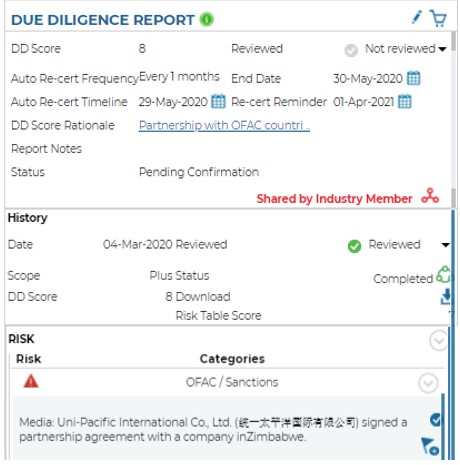
In the Due Diligence tile, you can view details relevant to due diligence reports that have been completed by Blue Umbrella. You can also manually assign a due diligence score and a re-cert timeline.
When viewing Due Diligence reports you are able to view the percentage of risk gathered from each category.
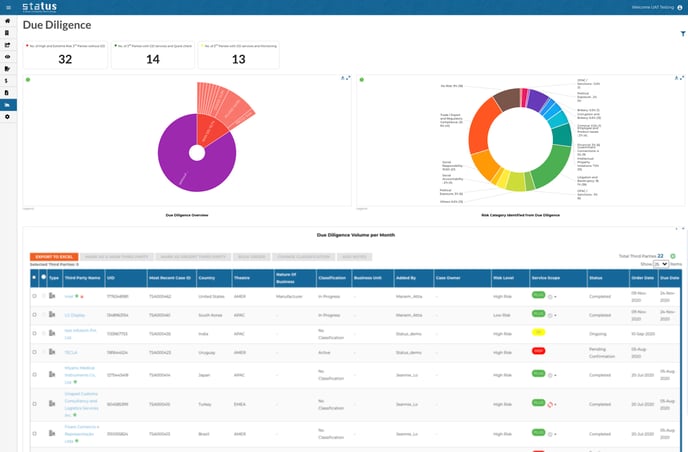
You can mark any due diligence risk as 'reviewed' or 'under review'
Industry Members
As a member of the Industry Initiative, if a shared report is available for this third party, you will see the share icon. Click the icon to view the details of the report.
A page-specific legend for icons can be found in the bottom right corner of each Status screen.
Please see Ordering Due Diligence Reports for more details on report scopes.