
Learn how to add third parties to Status.
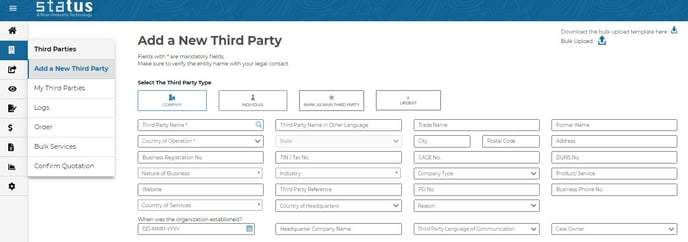
First select “Add a new third party”.
Then select “Company” or “Individual”. The requested information fields will update automatically.
Fill out the information.
Most fields are optional but the more information provided, the better Status will be able to assess your third party. Upon request, we can add custom fields for additional information.
By clicking on the looking glass next to Third Party Name, you can search and see if the third party you want to submit has already been added, thus preventing duplicates.
Click SUBMIT to add the third party.
You can now find the third party on the My Third Parties page.
Industry Matching for Industry Members
Note: In order to take advantage of this feature, your organization should join the i3 (Industry Integrity Initiative). Reach out to your client success manager to learn more.
When you click Submit to add a new third party, Status will search the third parties of other industry members to see if your third party "matches" with a third party shared by another Industry member. If there is a match, you will only know that your third party is shared by another member, but the identity of the other Industry member will not be disclosed.
You will be asked to review any possible or exact matches between the third party you are trying to add and another member’s third party. If you match the two third parties and indicate they are the same entity, you will be able to access the third party’s shared questionnaires and completed due diligence.
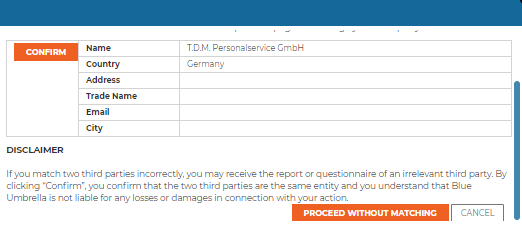
POWER USER TIP: If you match your third party with another member’s third party, you can access its shared reports and questionnaires, leading to cost-saving benefits and shorter turnaround times
Main Third Party
By marking a third party as a Main Third Party, you specify which entities you are dealing with directly, it is not mandatory to mark , however this will allow you to distinguish between your main third party and related entities which may be helpful when deciding who to order reports for in your third party universe.
You may mark certain corporations as Main Third Parties because you hold contracts with them and will therefore order due diligence for them. By contrast, you may add key shareholders or directors without marking them as Main Third Parties if you do not deal with them directly and do not order reports for them.
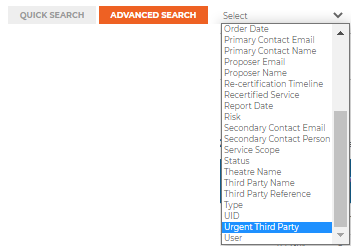
You can mark a Third Party as 'Urgent' to signify to your internal team that onboarding is urgent. You can then filter these in 'My Third Parties'
Primary Contact Information
The primary contact information is required so that Blue Umbrella can liaise with your third party if necessary (i.e sending Due Diligence Questionnaire requests). By selecting Third Party Language of Communication you can send third party interactions, such as questionnaires, in the third party’s preferred language.
Important Fields for Risk Algorithm
In addition to the Country of Operations which is mandatory for creating a new third party, four additional fields are important to the Blue Umbrella risk algorithm. If all of the following fields are completed, the algorithm will generate a static risk score:
- Country of Operations
- Nature of Business (multi-select, selection of highest risk will be considered)
- Industry
- Company Type
- Country of Services (multi-select, selection of highest risk will be considered).
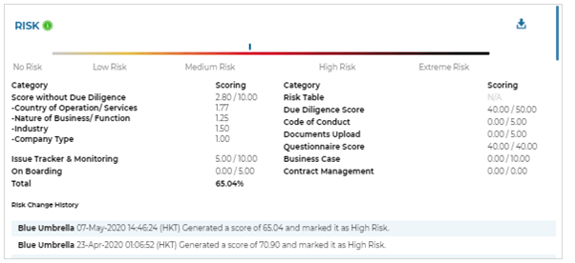
The risk score will be calculated based on the fields for which data is provided. It is not mandatory to provide values for all fields, but at a minimum Status requires the Country of Operations.
POWER USER TIP:
You auto-assign case owners based on the nature of business and business unit - to assign this automation please contact your Client Success Manager.
Bulk Upload
You can download the Bulk Upload XML template by selecting the download button. Once you have filled in the file, to upload, select Choose File & then click BULK UPLOAD. Please ensure that all mandatory fields have been completed and do not delete or re-order any columns of the template. If data for non-mandatory fields is not available, please leave the column blank.
The status of any Bulk Upload can be found under My Third Parties > Bulk Services.
After adding new third parties via bulk upload, exact matches will be automatically matched with the third parties of other Industry members. Any possible match will be available for matching under the “Bulk Services” page.